What Is a Keyless Entry Door Lock and How Does It Work?
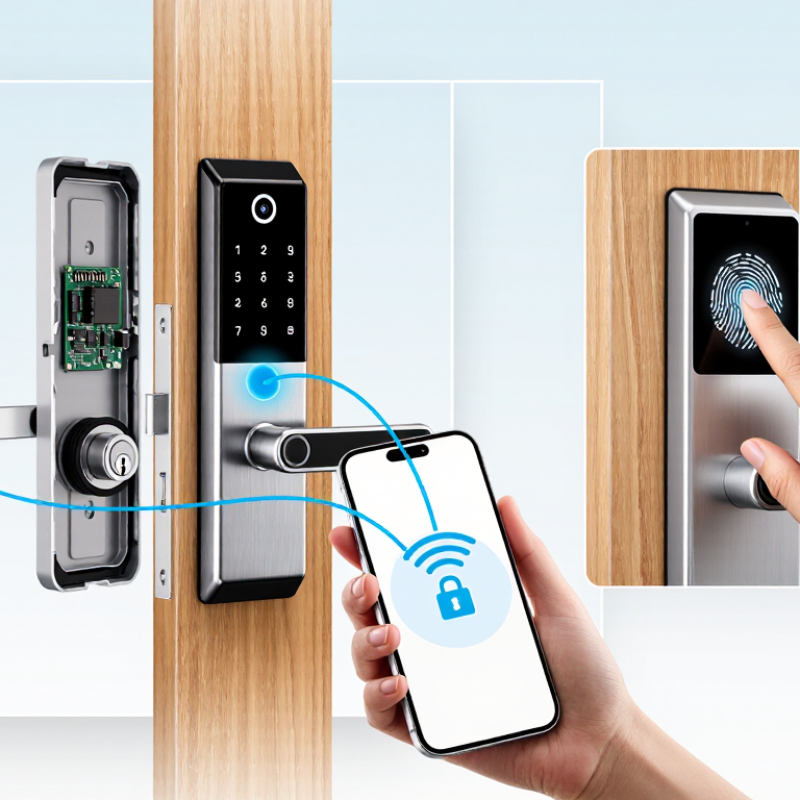
A Keyless Entry Door Lock replaces a traditional metal key with a code, fingerprint, smartphone signal, or proximity credential. Its purpose sounds simple: unlock the door without carrying a key. The technology behind it is more layered. A keypad sends an access code to a control unit. The unit checks that code, then activates a small motor that turns the locking mechanism. Some models use Bluetooth, Wi-Fi, or biometric sensors instead.
Bruce Schneier, a respected security technologist, said, “Security is a process, not a product.” This idea fits keyless locks closely. A strong device still needs careful installation, updated software, protected credentials, and a reliable backup method. A loose strike plate can weaken the entire system. A dead battery can leave a homeowner standing outside in the rain. Small details matter.
This guide explains how a Keyless Entry Door Lock works, what happens inside the lock, and which access methods provide practical value. It also considers battery warnings, emergency power options, mobile-app permissions, and mechanical overrides. These features are convenient, but convenience can create new points of failure. That deserves honest attention.
Not every smart lock is equally secure.
Some claims sound impressive but need testing. Real-world performance can vary with door alignment, signal strength, weather, and user habits. A thoughtful buyer should examine more than the screen, fingerprint reader, or polished packaging. The lock protects a physical entrance, so its complete system matters more than one clever feature.
What Is a Keyless Entry Door Lock?
A keyless entry door lock is an electronic locking system that opens without a traditional metal key. It verifies a digital credential, such as a PIN, fingerprint, access card, or smartphone signal. Inside the housing, a small motor moves the deadbolt after the control unit approves that credential. Some models also record entry times, helping homeowners review who entered and when.
The mechanism looks simple at the door. A keypad lights up under a fingertip. A short motor sound follows. However, dependable operation requires more than convenient access. The lock needs secure credential storage, encrypted communication, strong authentication, and reliable power management. NIST’s Digital Identity Guidelines emphasize secure authentication and protection against replayed credentials. The 2024 Verizon Data Breach Investigations Report also found that human involvement remained a major factor in breaches, reminding users not to share access codes casually.
In daily use, battery condition matters. A low battery can turn a useful lock into a stressful problem. Many systems provide warning alerts and an exterior emergency power contact, but users should test these features before an emergency. No electronic lock is flawless. A forgotten PIN, weak phone security, or poor installation can reduce protection. Professional fitting, unique credentials, firmware updates, and a tested mechanical backup improve reliability.
How Keyless Entry Door Locks Identify Authorized Users
A keyless entry door lock replaces a traditional metal key with an electronic credential. Authorized users may unlock it with a PIN, fingerprint, mobile credential, or proximity token. The lock’s internal controller checks the presented information against approved records. If the details match, a motor retracts the latch and allows entry.
Identification happens in seconds. A PIN pad compares entered numbers with stored codes, while a fingerprint sensor examines unique ridge patterns. Some systems use encrypted wireless credentials that change or refresh during communication. This makes simple copying more difficult. Access permissions can also be limited by time, so a cleaner might enter during scheduled hours but not overnight. In professional installations, administrators should create separate credentials for each user. Shared codes reduce accountability.
Real-world performance depends on careful setup and maintenance. Dust, wet fingers, poor lighting, or a drained battery can affect recognition. I have found that a lock may work smoothly indoors but respond slowly near an exposed doorway. No system is perfect. That matters.
Reliable users keep emergency power options available and review access records regularly. They should remove former users promptly and protect PINs from visible keypad wear. Biometric data also deserves careful handling because it cannot be changed like a password. A well-designed lock identifies authorized users through layered checks, yet human oversight remains essential.
How a Keyless Entry Door Lock Works Step by Step
A keyless entry door lock replaces a traditional metal key with a code, access card, fingerprint, or mobile signal. Its operation begins when a user presents an approved credential. A keypad reads the entered numbers and sends them to a small control unit. The unit compares the input with stored data. If the details match, it activates a motor or solenoid. That movement retracts the bolt from the strike plate.
The door opens.
Inside the lock, sensors confirm whether the bolt moved correctly. Many systems also record access time, which helps property owners review unusual activity. A properly fitted bolt matters because even a strong motor may struggle against a misaligned door. During installation, the door should close smoothly before electronic features are tested. This practical check is easy to overlook.
Power usually comes from batteries, so the lock monitors voltage and may provide a warning before shutdown. Some models include an external emergency power contact or a protected mechanical backup. These features improve reliability, but they are not magic. Dead batteries, forgotten codes, and damp conditions can still cause problems. Users should protect access codes and update them when necessary. Regularly checking the battery compartment, screws, and bolt alignment can reveal small faults before the lock refuses entry.
What Is a Keyless Entry Door Lock and How Does It Work?
A keyless entry door lock replaces a traditional metal key with an electronic credential such as a PIN, RFID card, smartphone signal, or biometric scan. The lock detects the credential, verifies it against stored authorization data, activates the internal motor, and confirms whether the door is locked or unlocked. The chart shows the actual sequence of the unlocking process.
Main Types of Keyless Entry Door Locks
Keyless entry door locks replace a traditional metal key with an access method such as a code, fingerprint, phone, or access card. Inside the lock, a small motor moves the deadbolt after the system verifies the stored credential. Power usually comes from batteries, so low-battery alerts and emergency power contacts matter during daily use.
Keypad locks use a personal code entered on numbered buttons. They are practical for families, rental properties, and service access because codes can be changed without replacing a cylinder. Biometric locks read a fingerprint through a sensor and compare it with saved data. They offer quick entry, but wet, dirty, or worn fingers may cause failed scans.
Smart locks connect through Bluetooth, Wi-Fi, or another wireless network. An app can create temporary codes, record entry times, or lock the door remotely. This convenience depends on stable power and secure account settings. Some locks use RFID cards or small tags instead, which can suit offices and shared spaces. However, every access method needs careful management.
In my experience, installation quality affects reliability as much as the lock type. A misaligned deadbolt may drain batteries and produce repeated errors. Keep a physical backup plan. Test the lock with the door closed, check the battery warning, and review user permissions regularly. No system is perfect.
Security, Power, and Maintenance Considerations
What Is a Keyless Entry Door Lock and How Does It Work?
A keyless entry door lock replaces a traditional key with a code, fingerprint, card, or mobile signal. Inside, a small motor moves the deadbolt after the system verifies the entry method. Some models also include a physical backup key or interior thumb turn. That backup matters. Electronic convenience should not remove every manual option.
Security depends on more than the lock itself. Choose a strong, unique access code, and avoid birthdays or repeated numbers. Delete codes for former residents, temporary workers, or guests who no longer need access. Keep the door frame sturdy, because a powerful lock cannot repair weak wood or loose screws. Automatic locking is useful, but it can also lock someone out unexpectedly. Test the timing before relying on it every day.
Power problems deserve attention. Batteries may weaken without obvious warning, especially during cold weather. Check the warning signal promptly, and keep the correct replacement batteries available. An emergency power contact can help, but it should not be treated as a permanent solution. Clean the keypad with a soft, slightly damp cloth. Do not pour cleaner into openings. Inspect the bolt monthly for resistance, dust, or misalignment. A scraping sound often indicates door pressure, not immediate lock failure. I have found that people blame the electronics too quickly. Sometimes, the door simply needs adjustment.